![tagalys-logo white.png]](https://support.tagalys.com/hs-fs/hubfs/tagalys-logo%20white.png?height=40&name=tagalys-logo%20white.png)
Smart Collections refer to creating dynamic product listing pages wherein the list of products included and excluded is controlled by data conditions set by the merchant. The Smart Collections also gives you the ability to define automated product sorting using data to improve the performance.
There are two ways a merchant can create a Smart Collection :
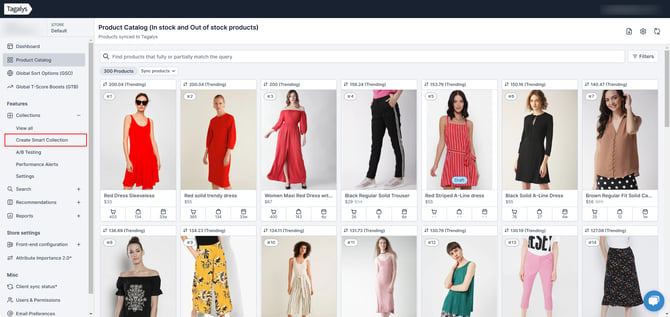
- Click the 'Create Smart Collection' on the left panel of the Tagalys Dashboard.
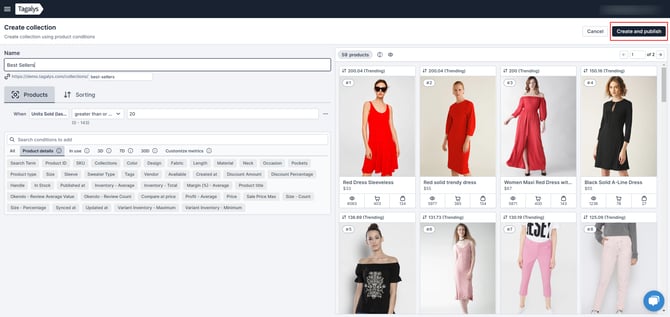
- In the Merchandise Collection section, select the attributes and set conditions for the smart collection. Once you are done click on 'Create and Publish'.
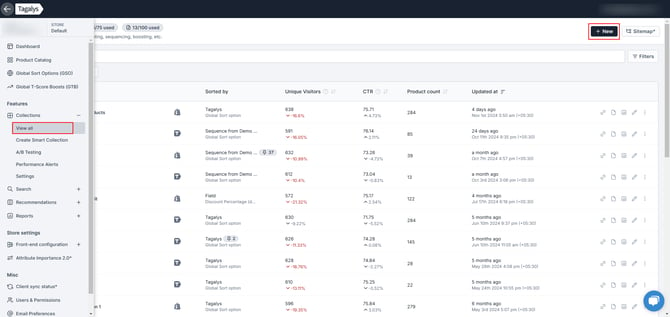
- Click on 'View all' under collections on the left panel of the Tagalys Dashboard. Click on 'New' on the top right corner of the page.
- In the Merchandise Collection section, select the attributes and set conditions for the smart collection. Once you are done click on 'Create and Publish'.